
Batch Image Watermark Tool: Add Logo & Text to Multiple Images Online
That’s why CloudFace AI’s Batch Watermark Tool exists. It allows you to upload multiple images, apply logo and text watermarks, and download everything in a single ZIP file — quickly and securely.
Protecting your digital images is no longer optional.
If you share photos online, run an e-commerce store, manage social media, or publish creative content, your images are valuable assets. Without protection, they can be copied, reused, or misused.
That’s why CloudFace AI’s Batch Watermark Tool exists.
It allows you to upload multiple images, apply logo and text watermarks, and download everything in a single ZIP file — quickly and securely.
Try it here:
👉 https://cloudface-ai.com/image-tools
What Is the Batch Watermark Tool?
The Batch Watermark tool is designed to help users add watermarks to many images at once.
Instead of editing each image manually, you can:
Upload multiple files
Apply the same watermark
Export everything together
It is a product of Elephic Technologies, ensuring high-quality image processing and reliable performance.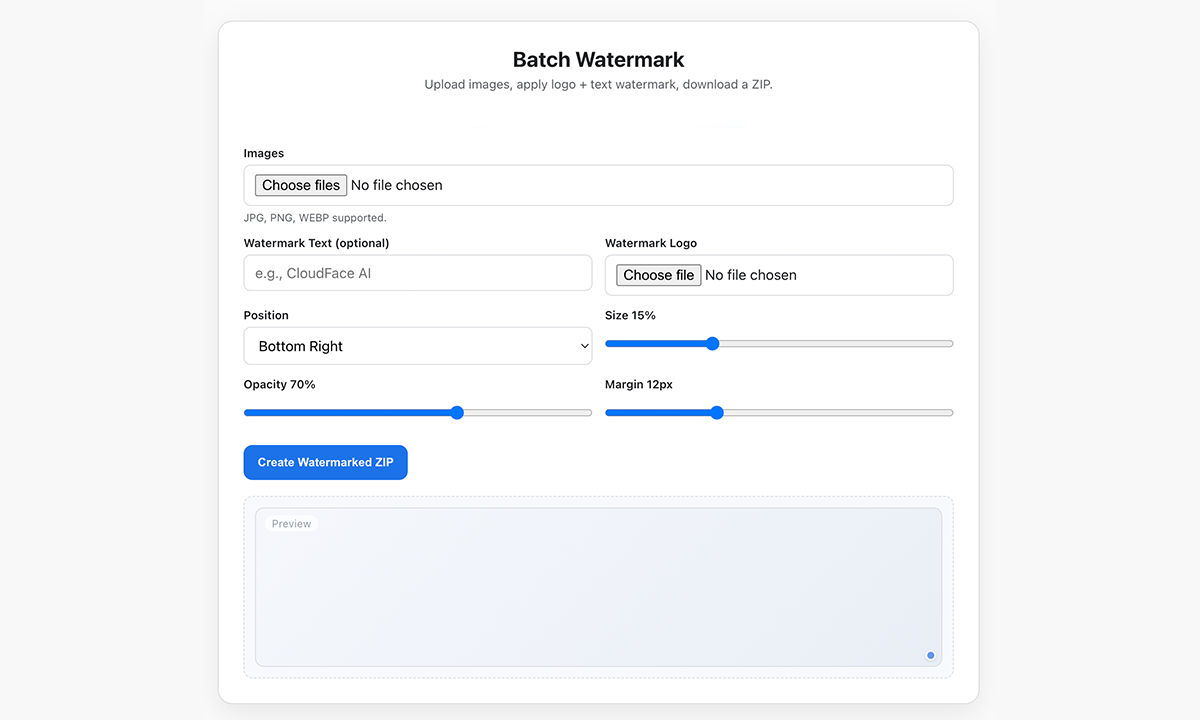
Supported Image Formats
The tool supports modern and widely used formats:
JPG
PNG
WEBP
This ensures compatibility with websites, social media platforms, and marketplaces.
Key Features of Batch Watermark Tool
1. Bulk Image Upload
You can upload multiple images at the same time.
There is no need to process files one by one. The system handles them together, saving time and effort.
Perfect for:
Photographers
Store owners
Designers
Social media managers
2. Text Watermark Support
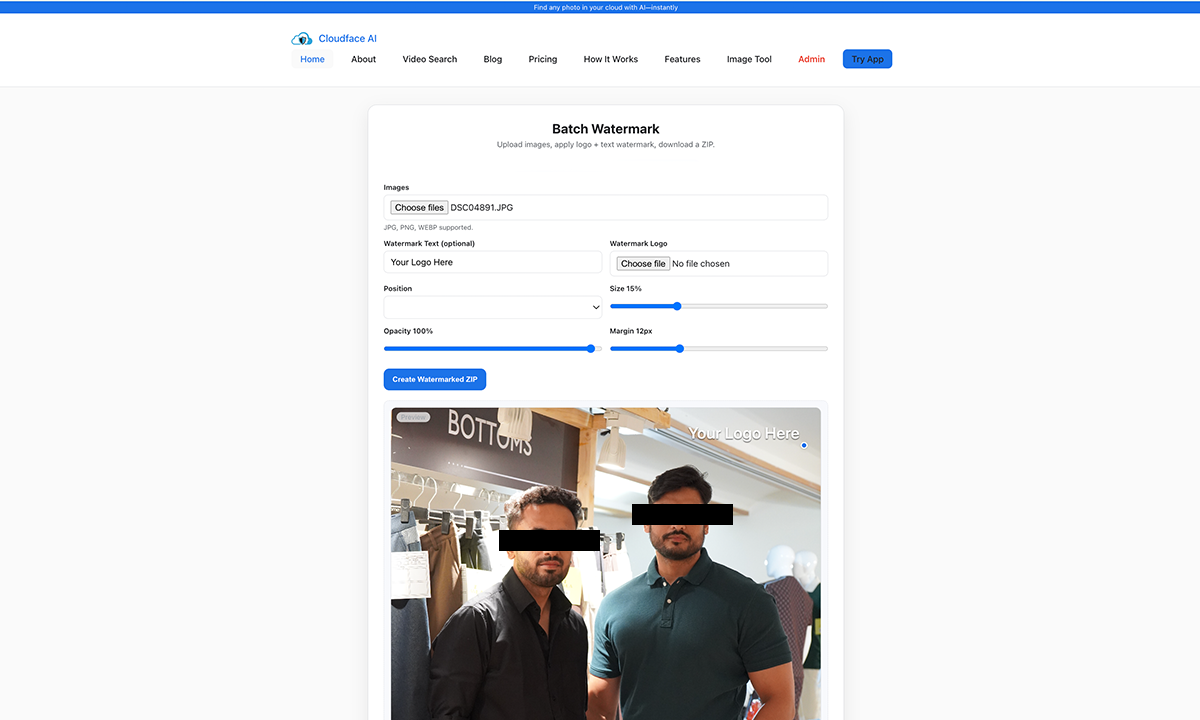
You can add custom text to your images, such as:
Brand name
Website URL
Copyright notice
Creator signature
Example:CloudFace AI
Text watermarks help establish ownership and brand visibility.
3. Logo Watermark Upload
Along with text, you can upload your own logo.
This allows you to:
Strengthen brand identity
Prevent unauthorized use
Look more professional
Build recognition
Your logo is applied consistently to all selected images.
4. Custom Position Control
You can choose where the watermark appears.
Available option:
Bottom Right (default)
This position is carefully selected to remain visible without disturbing the main content of the image.
5. Adjustable Size
You can control how large the watermark appears.
Default setting:
Size: 15%
This keeps the watermark noticeable but not distracting.
You get balance — protection without ruining aesthetics.
6. Opacity Control
Opacity determines how transparent the watermark is.
Default:
Opacity: 70%
This makes the watermark visible while blending naturally with the image.
It avoids harsh overlays that reduce image quality.
7. Margin Customization
Margin controls the spacing between the watermark and the image edge.
Default:
Margin: 12px
This prevents the watermark from sticking to borders and improves visual balance.
8. ZIP Download Export
After processing, all images are packaged into a ZIP file.
You can:
Download everything in one click
Store easily
Share quickly
Upload to platforms instantly
No manual downloads. No extra steps.

How the Batch Watermark Tool Works
The workflow is simple and efficient.
Step 1: Upload Images
Select multiple JPG, PNG, or WEBP files.
Step 2: Add Watermark
Enter your text and/or upload your logo.
Step 3: Customize Settings
Adjust position, size, opacity, and margin.
Step 4: Generate ZIP
Click “Create Watermarked ZIP” and let the system process.
Step 5: Download
Download your ready-to-use watermarked images.
No learning curve. No technical setup.
Who Should Use This Tool?
This tool is designed for anyone who publishes images online.
Content Creators
Protect your original work from misuse.
E-commerce Sellers
Add branding to product photos.
Photographers
Prevent unauthorized distribution.
Digital Agencies
Deliver branded assets to clients.
Bloggers & Influencers
Maintain ownership of visual content.
Why Batch Watermarking Matters
Here’s the thing: once an image is online, control becomes difficult.
Without watermarking:
Your work can be copied
Your brand gets lost
Credit disappears
Revenue opportunities vanish
With batch watermarking:
Ownership is visible
Branding stays intact
Trust increases
Professionalism improves
It’s digital self-defense for creatives.
A Trusted Product from Elephic Technologies
CloudFace AI’s Batch Watermark feature developed by Elephic Technologies.
This means:
Stable processing
High-quality rendering
Optimized performance
Reliable scaling
Your files are handled using proven image technology.
Security & File Privacy
Your files are processed securely.
No permanent storage
Temporary processing only
Automatic cleanup
Encrypted transfers
Your images remain private.
Always.
Benefits for Website Performance & Workflow
Using batch watermarking improves productivity.
You get:
Faster content publishing
Reduced editing workload
Consistent branding
Better asset management
For developers and businesses, this means smoother pipelines and fewer manual steps.
Frequently Asked Questions (FAQ)
Q.1: Can I add both text and logo together?
Ans: Yes. You can use text and logo simultaneously.
Is there any watermark limit?
You can process multiple images at once. Limits depend on server capacity.
Q.2: Does watermarking reduce image quality?
Ans: No. The tool preserves original resolution and clarity.
Q.3: Do I need an account?
Ans: No. You can use the tool without registration.
Q.4: Can I use this on mobile?
Yes. It works on all modern browsers.
Start Protecting Your Images Today
Your images carry your identity.
Don’t leave them unprotected.
Use CloudFace AI’s Batch Watermark Tool to brand, secure, and distribute your visuals with confidence.
Try now:
👉 https://cloudface-ai.com/image-tools
One upload. One click. Complete protection.